Helping Frank with his computer/Audacity

SUPPORTER
Posts: 2146
Joined: 27 set 2014
This is from track #99567:
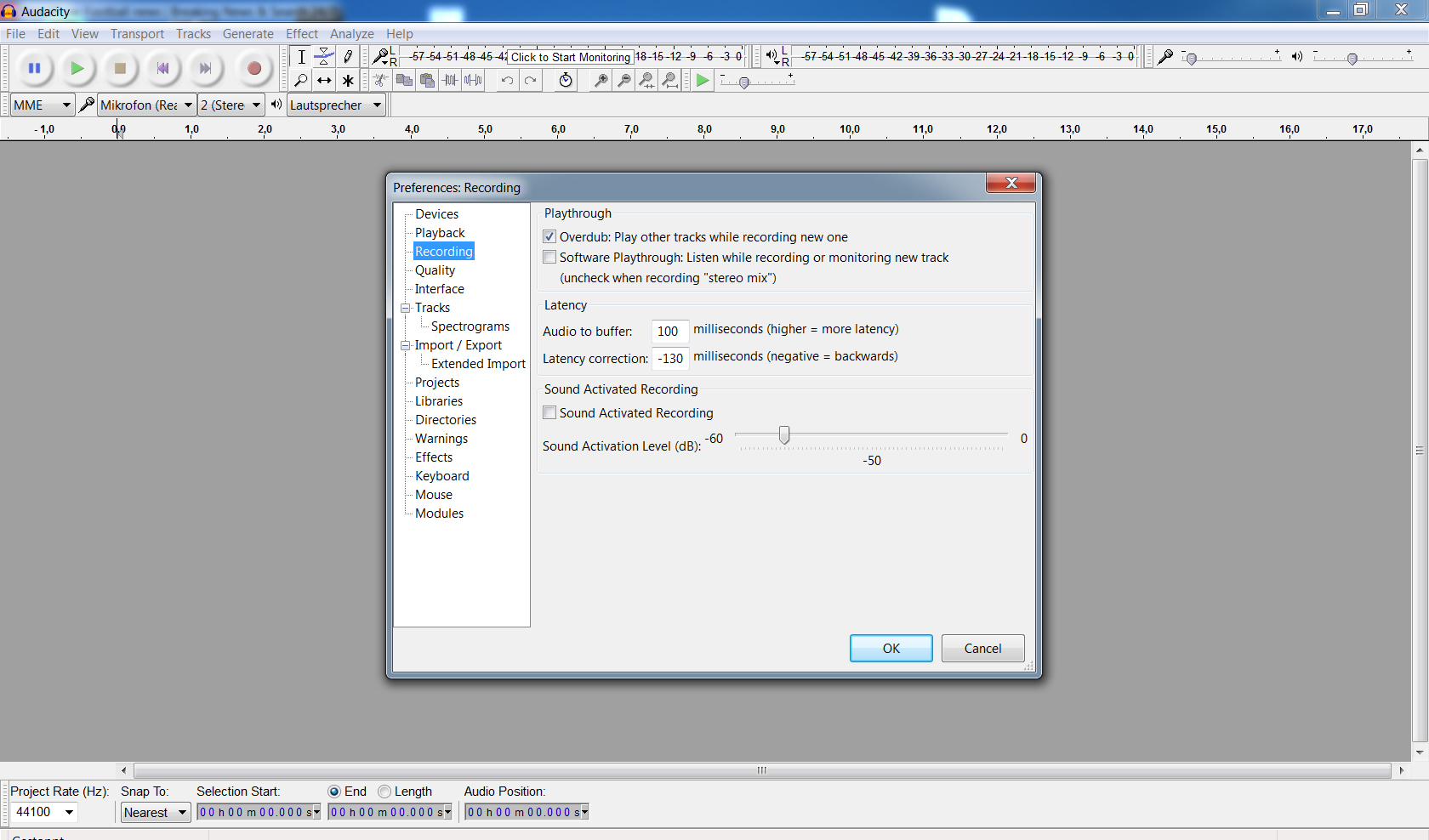
Frank, as I answered there, I think you got to check your audacity settings. I have uploaded my settings as an image, have a look if this is what you have.
TeeGee attached the following image:
Edited by TeeGee on 3 marzo 2017 alle ore 18:23
FRANK2654 wrote: TeeGee, I am Willing to Try to Make That Guitar Solo Louder At 1:40.....I Still haven't figured out how to Record a single track only without the original template included...I use audacity for recording on my computer and can't figure out how to just listen to a Mix with recording it along with the new overdub....
However I do have a standalone multitrack recorder separate from computer that does allow. But it would be nice to do this with Audacity on Computer...I think it has something to do with the computer sound card and the ability to listen to a track without recording it when recording a new track...does that make sense?"
However I do have a standalone multitrack recorder separate from computer that does allow. But it would be nice to do this with Audacity on Computer...I think it has something to do with the computer sound card and the ability to listen to a track without recording it when recording a new track...does that make sense?"
Frank, as I answered there, I think you got to check your audacity settings. I have uploaded my settings as an image, have a look if this is what you have.
TeeGee attached the following image:
Edited by TeeGee on 3 marzo 2017 alle ore 18:23

Member
Posts: 32
Joined: 31 ago 2011
TeeGee My Audacity has the Sane settings as you
Ernie Ball 2221 Regular Slinky Gitarrensaiten
Saitensatz für E-Gitarre

5,90 €
iThis widget links to Thomann, our affiliate partner. We may receive a commission when you purchase a product there.
Visit Shop

Member
Posts: 250
Joined: 30 apr 2016
Frank
One strategy is to make another track and copy your lead part into that track and increase the Volume at the Lead part only by using the "Rubber band" volume controls ---which enable you to lower and increase the VOLUMES in a specific spot or spots in the timeline--or during the song.
One strategy is to make another track and copy your lead part into that track and increase the Volume at the Lead part only by using the "Rubber band" volume controls ---which enable you to lower and increase the VOLUMES in a specific spot or spots in the timeline--or during the song.
Member
Posts: 37
Joined: 13 gen 2017
To record the single track only is easy. You record your track as you play along with the original. Then mute the original track before you do your export. That leaves only your recording in the mp3 without the original in the mix at all. As for increasing volumes. I find a spot in the song I want to lower or raise volume, I simply highlight that section and use the effect "amplify" to either lower or raise that part. I have reaper, but keep going back to audacity a lot since I am more used to it :)
Le jamsession online di wikiloops sono disponibili con il gentile
sostegno di:

I supported Wikiloops not for their name, I support it because it was a great idea & is a great way for musicians to jam outside their circles.
Evosaki900