Drivers, Asio Crackle and Pop...Grrrrr
SUPPORTER
Posts: 42
Joined: 25 mag 2012
Hey all...
Just got back into recording again. New DAW (Mixcraft). New interface for the guitar to go to PC (Fender AudioBox Go). Too much latency using Windows (Low Latency) input was driving me bonkers. Downloaded Asio4all...after MANY more minutes than I wanted to spend I finally got it to work with Mixcraft for the input and able to monitor on my speakers. NOW though...I'm getting this annoying crackle and I have looked at all bit rates for inputs and outputs. Tried to adjust the buffer size to it's max on ASIO and no change.
Can anyone shed a little light here for me or know what the heck is causing it? Or a better way without ASIO? S . O . S. !
Dan S
Just got back into recording again. New DAW (Mixcraft). New interface for the guitar to go to PC (Fender AudioBox Go). Too much latency using Windows (Low Latency) input was driving me bonkers. Downloaded Asio4all...after MANY more minutes than I wanted to spend I finally got it to work with Mixcraft for the input and able to monitor on my speakers. NOW though...I'm getting this annoying crackle and I have looked at all bit rates for inputs and outputs. Tried to adjust the buffer size to it's max on ASIO and no change.
Can anyone shed a little light here for me or know what the heck is causing it? Or a better way without ASIO? S . O . S. !
Dan S

SUPPORTER
Posts: 609
Joined: 4 lug 2020
I recall having some crackling, etc when setting up my FocusRite for the first time. The only thing I can recommend is making sure all the settings match across your DAW and software for your Fender AudioBox Go and buffer size.
I keep my sample rate at 44100 and clock synced to internal. My PC is probably on the low to low-mid end of the computer processing spectrum so a buffer size of 512 works for me. when working with many tracks, i sometimes have to increase that buffer size to 768 or i'll get a bunch of noise.
rootshell attached the following image:
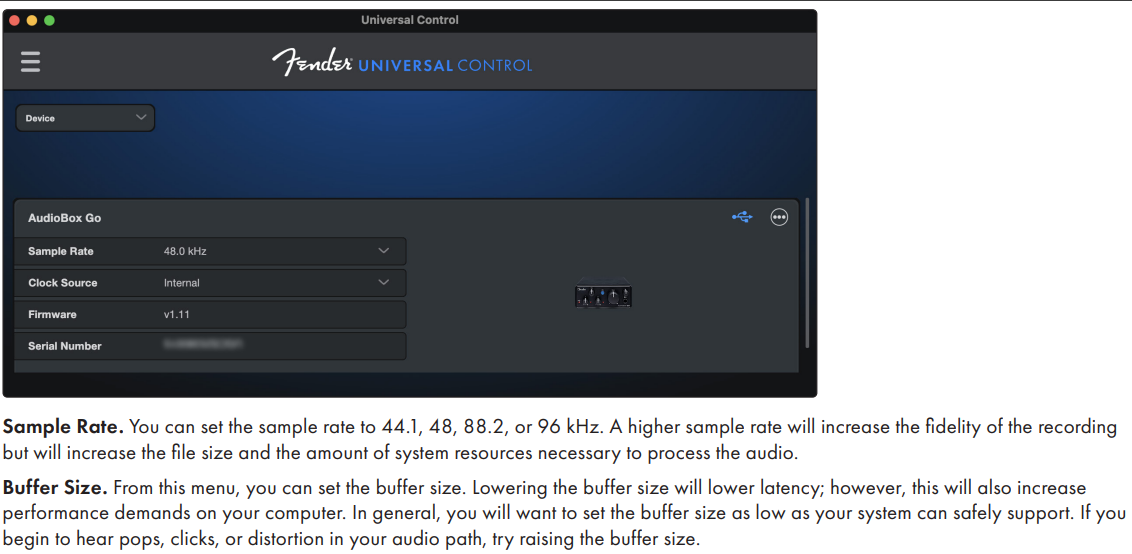
I keep my sample rate at 44100 and clock synced to internal. My PC is probably on the low to low-mid end of the computer processing spectrum so a buffer size of 512 works for me. when working with many tracks, i sometimes have to increase that buffer size to 768 or i'll get a bunch of noise.
rootshell attached the following image:
+2
Ernie Ball 2221 Regular Slinky Gitarrensaiten
Saitensatz für E-Gitarre

5,90 €
iThis widget links to Thomann, our affiliate partner. We may receive a commission when you purchase a product there.
Visit Shop
SUPPORTER
Posts: 42
Joined: 25 mag 2012
I knew I would get more helpful answers here than anywhere...will be looking into all of this today! Thank you
Dan S
Dan S

SUPPORTER
Posts: 105
Joined: 4 lug 2014
Danalyze45 wrote:
...Downloaded Asio4all...
Can anyone shed a little light here for me or know what the heck is causing it? Or a better way without ASIO? S . O . S. !
Dan S
...Downloaded Asio4all...
Can anyone shed a little light here for me or know what the heck is causing it? Or a better way without ASIO? S . O . S. !
Dan S
It may sound strange to you but ASIO is the better way out, simply not Asio4all. Asio4all was and is intended mainly for testing and is widely not considered as a serious driver. Your interface probably comes with a real ASIO-driver tailored for the model. unless of course you might have got a ultra low budget interface as sold by Temu/AliExpress and Amazon, but also the lower budget series like Behringer and such. Find out before you buy if it has a dedicated ASIO driver and stick with that. Tweak your settings to what you are doing at that moment, recording or mixing. This gives you the best results within the limitations of your hardware.
Recording (Tracking) Settings:
Target buffer: 32, 64, or 128 samples (under 10 ms round-trip latency)
Why: You need instant feedback when you press a key or sing into a mic so your timing does not feel off.Tip: Turn off heavy plugins on the active track, or use your audio interface's direct hardware monitoring to bypass computer delay entirely.
Mixing Settings
Target buffer: 512, 1024, or 2048 samples
Why: Real-time physical performance is no longer required.
Tip: High buffers give your computer processor more time to compute heavy tasks like convolution reverbs, tape saturation, and complex channel strips.
If you adapt your settings you have the least chance on pops and crackles. If it remains unworkable there might be more in need of upgrading. To give an example I still work on an 'old' i7-6700k with 32GB RAM. I believe it was introduced somewhere in 2015. But I can handle quite a lot of tracks and plugins. I do monitor my instrument outside (before going into) my interface and DAW so I've got no latencyproblems there.
+4
SUPPORTER
Posts: 42
Joined: 25 mag 2012
I think I've gotten it sussed out but ty! So much good info on the technical side here made easy to understand!
+2
Le jamsession online di wikiloops sono disponibili con il gentile
sostegno di:

I´m not a very good guitarist but this site is awesome. Will keep on supporting :-) Greetings from Germany :-)
Chuck Stew